
The bittyBIG Dynamic Camera + Renderer System - Stencyl
A downloadable tool
Modern cameras. Smarter rendering. Still Stencyl.
The bittyBIG Dynamic Camera + Renderer System is a complete camera, viewport, display, and rendering pipeline built specifically for Stencyl.
Build smoother cameras, multi-camera layouts, split-screen, picture-in-picture, zoom, screenshake, viewport effects, cached world rendering, smooth parallax backgrounds, pixel-perfect output, and more — without leaving Stencyl’s normal workflow.
You keep making the game in Stencyl.
bittyBIG takes stronger control of how that world is viewed, rendered, composed, and presented.
- Create a working player-following camera in two blocks.
- Render multiple cameras without repeatedly rebuilding the same static world.
- Use smooth floating-point camera and parallax presentation.
- Build split-screen, picture-in-picture, and custom display layouts.
[ HERO GIF — smooth camera + parallax + split-screen + zoom/shake montage ]
A Camera + Renderer System — Not Just Another Camera Behavior
Polished games eventually ask for more than “follow this Actor.” They need control over what is viewed, where it appears, how it scales, and how efficiently the world is rendered.
bittyBIG treats those jobs as separate systems:
Camera — Controls what part of the world is being viewed.
Viewport — Controls where and how a Camera image appears.
Display — Controls the final composed game output.
Renderer — Controls how Stencyl world content, tiles, backgrounds, Cameras, and Viewports are turned into that output.
That separation lets the system scale from a simple player-following Camera to multi-camera rendering and custom display compositions without changing the rest of your game.
A Working Camera Takes Two Blocks
For a normal player-following Camera:
- Create Camera
- Follow Actor
For a static Camera:
- Create Camera
- Set Camera Center
That’s it.
The system prepares its own Camera/render pipeline automatically. No Initialize block and no special scene-render setup.
[ GIF — creating a working camera in seconds ]
Smooth Camera Movement
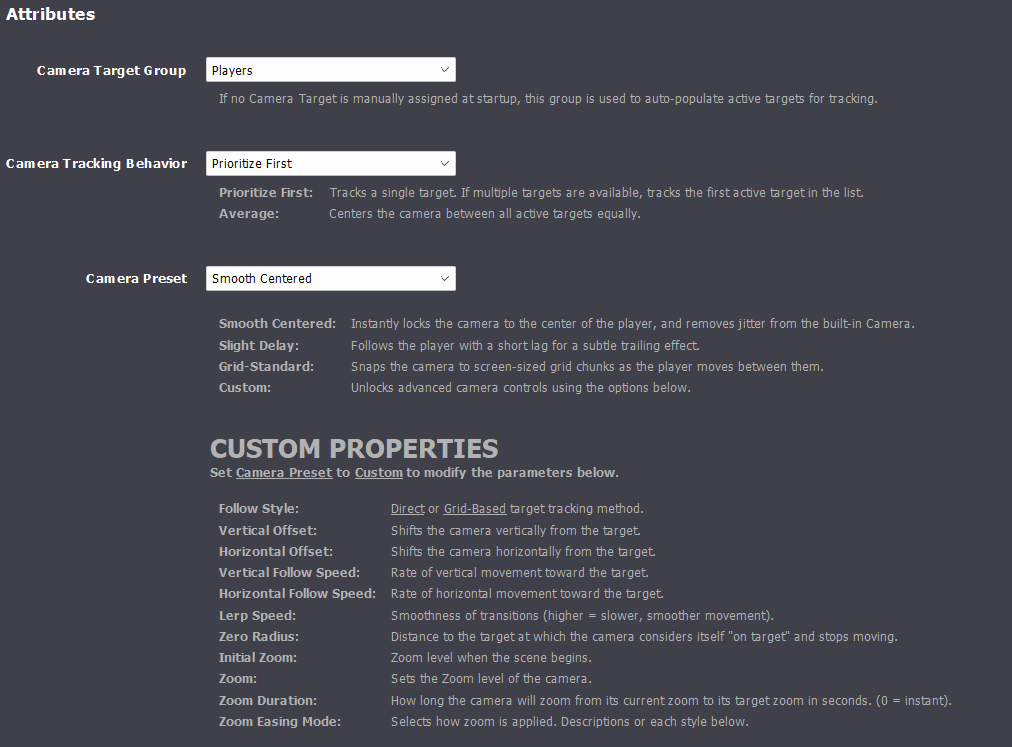
Start with an included preset or tune the movement yourself.
Included presets:
- Centered
- Smooth Centered
- Soft Follow
- Delayed Follow
- Horizontal Priority
- Grid
- Smooth Grid
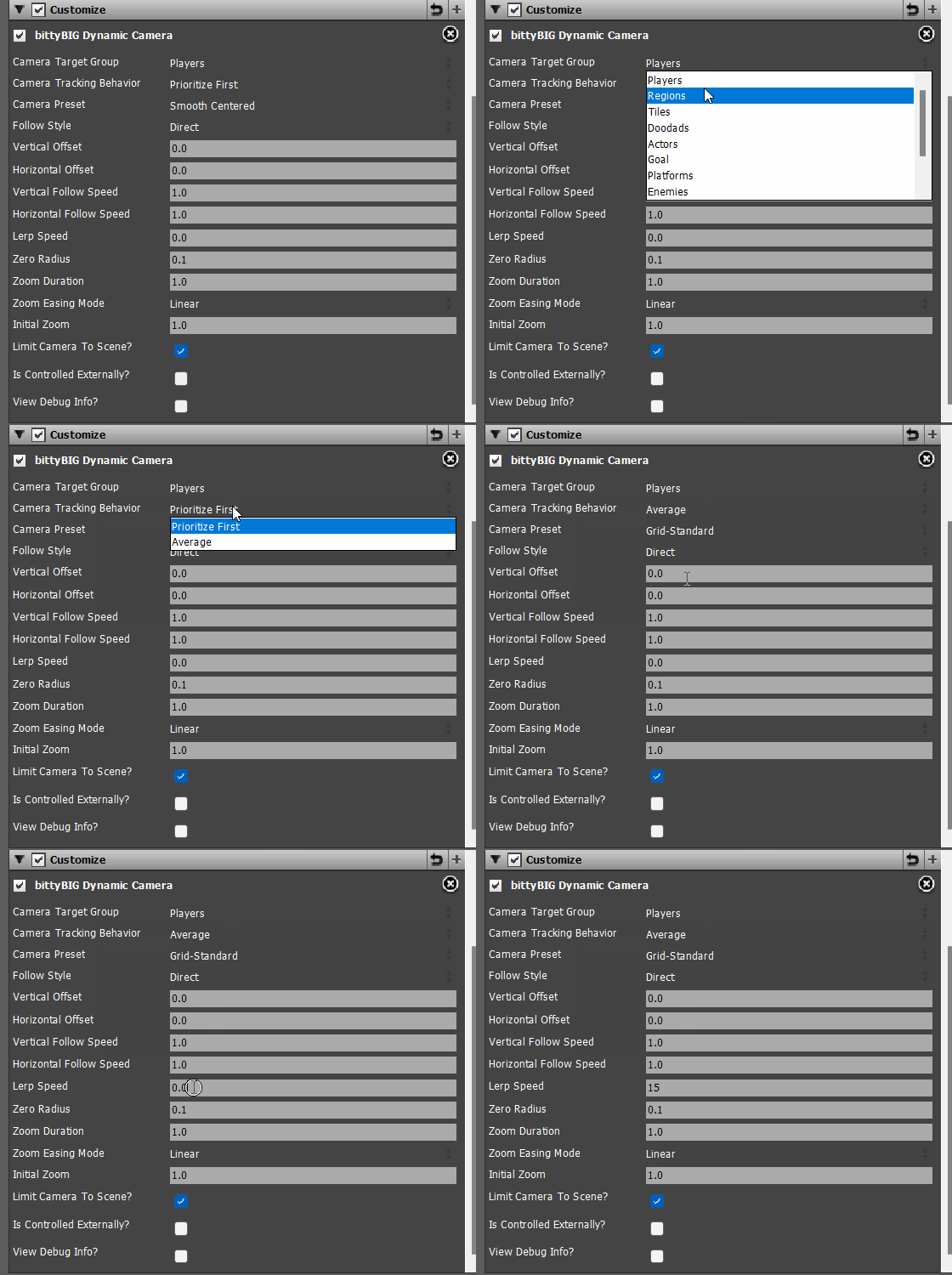
You can also control Camera targets, persistent Actor following, offsets, follow speeds, smoothing, snapping, grid size, scene bounds, and Camera size.
[ GIF — camera preset comparison ]
Multiple Cameras. Any Layout.
Create independent Cameras and render them into independent Viewports.
- Full-screen views
- Left / right split-screen
- Top / bottom split-screen
- Four-player layouts
- Picture-in-picture
- Secondary Camera views
- Boss views
- Security monitors
- Custom compositions
Camera Size and Viewport Size are independent, so how much world a Camera sees does not have to match how much screen space is used to display it.
[ GIF — Full → Split → Four View → Picture-in-Picture ]
Shared Cached Tile / World Rendering
This is no longer only a camera extension. bittyBIG includes a shared static tile rendering cache designed specifically for efficient Camera rendering.
Instead of asking Stencyl to redraw the same static tile world independently for every Camera, reusable tile imagery is cached and shared. When tile content changes, only the affected cached content needs to refresh.
Result: less repeated rendering work, better multi-camera performance, and less dependence on Stencyl’s built-in Camera render path.
[ GIF / DIAGRAM — repeated tile rendering vs shared BittyTileCache ]
Automatic Cache Refresh
Manual cache-management blocks were originally planned. They became unnecessary.
Normal tile changes and relevant cached content changes can be detected and refreshed automatically.
Result: users make the game; the renderer manages its own cache.
Changed-Chunk Updates
A changed tile does not require the entire cached world to be rebuilt. Only affected cached cells/chunks need updating.
On the Windows GPU-first path, reusable chunk images can remain GPU-side while changed chunks are refreshed.
Performance Target
In one stress test:
- 3840 × 2160 game output
- 4 simultaneous Cameras
- 1920 × 1080 each
- approximately 30–40 MiB memory
That is the kind of multi-camera workload this architecture was built to handle efficiently.
[ IMAGE / GIF — performance capture ]
Smooth Backgrounds and Parallax
Stencyl still owns your background assets, animation state, scrolling state, and timing. bittyBIG can control their final Camera presentation using floating-point Camera and parallax positioning.
- Static backgrounds
- Animated backgrounds
- Repeating backgrounds
- Custom scroll factors
- Independent scrolling
- Parallax
Result: smoother background movement and parallax that stays aligned with the bittyBIG Camera.
[ GIF — smooth parallax close-up ]
Cleaner HTML5 Tile Presentation
Smooth Camera movement and browser tile rendering are not always friends.
Rather than forcing the Camera to snap or hiding seams with increasingly elaborate edge tricks, the cached renderer avoids repeatedly asking HTML5 to interpret the same individual tiles at changing subpixel Camera positions.
Fix the render path instead of hiding the symptom.
[ GIF — HTML5 before / after ]
Zoom, Screenshake, and Viewport Effects
Presentation effects are built into the same system.
- Instant Camera zoom
- Tweened zoom with easing
- Screenshake
- Independent X/Y shake strength
- Viewport rotation
- Viewport rotation over time
- Horizontal flip
- Vertical flip
- Transform reset
[ GIF — effects montage ]
Backgrounds, Overlays, and Borders
Customize individual Viewports or the entire Display.
Viewport controls
- Background colors
- Background images
- Background image scale modes
- Overlay colors
- Overlay images
- Overlay scale modes
- Borders
- Per-side border thickness
- Viewport scale modes
Display controls
- Background colors
- Background images
- Background scaling
- Display overlays
- Display sizing and positioning
- Borders
[ GIF — backgrounds / overlays / borders ]
Pixel-Perfect When You Want It
Camera Size, Viewport Size, Display Area, and final Stencyl Screen Size are intentionally separate concepts.
Example: 320 × 180 Camera → 1920 × 1080 Viewport = clean 6× presentation
That gives pixel-art projects predictable scaling without forcing higher-resolution projects into the same workflow.
[ IMAGE — Camera → Viewport → Display diagram ]
Built-In Debugging
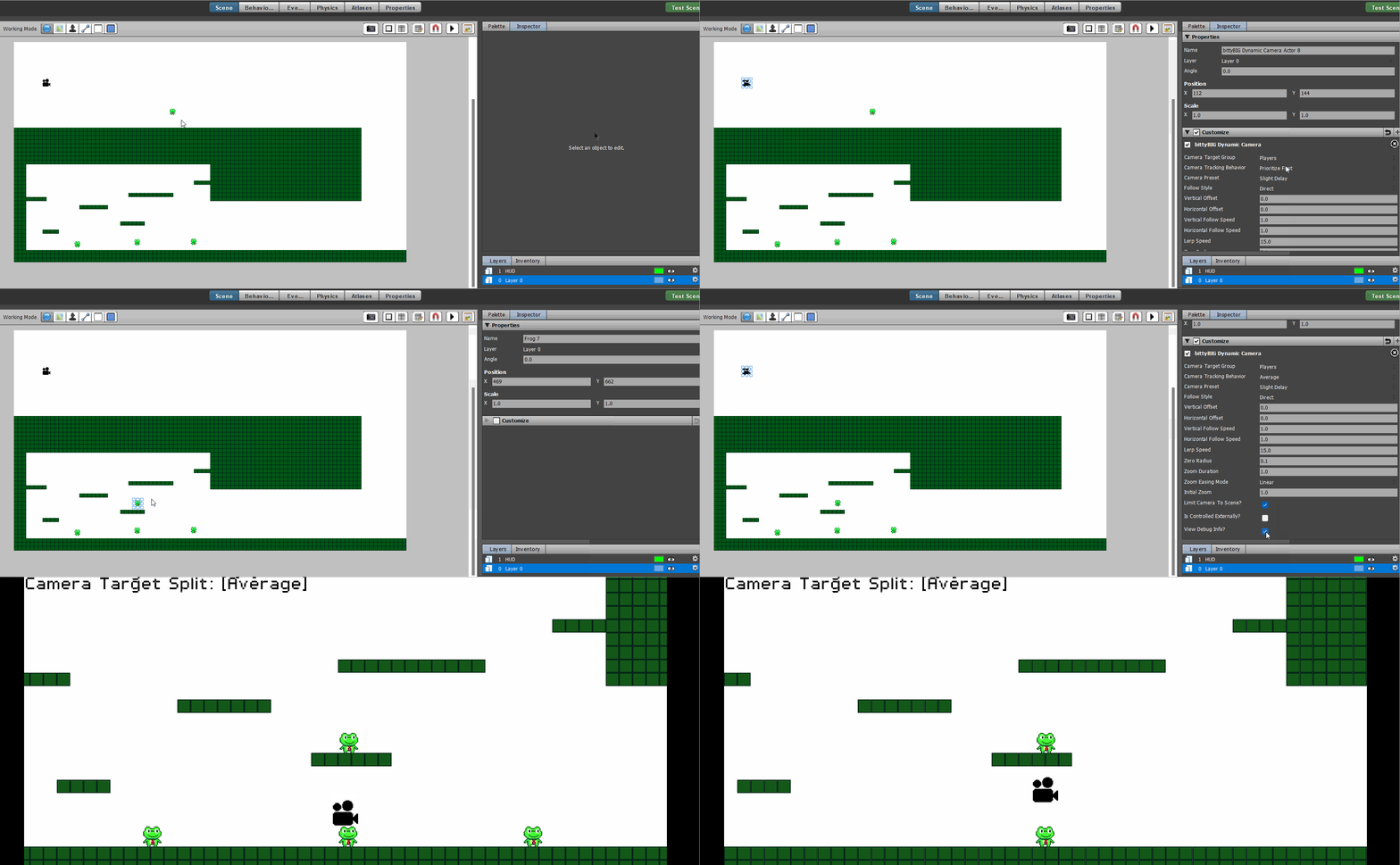
Dedicated Debug blocks can print readable multi-line runtime reports for:
- Camera
- Viewport
- Display
- Camera System
This makes it much easier to inspect Camera targets, Viewport state, zoom, transforms, backgrounds, overlays, and system configuration without manually tracing dozens of values.
[ SCREENSHOT / GIF — Debug Camera output ]
Interactive Layout Editor
The documentation includes a visual Layout Editor for planning and generating common Viewport arrangements.
- Full
- Left / Right Split
- Top / Bottom Split
- Four View Grid
- Picture-in-Picture
- Smaller Display Area
Adjust Screen Size, Display Area, and Viewport values visually, preview the result, then generate the setup.
[ GIF — Layout Editor ]
Built for Stencyl — Not Instead of Stencyl
bittyBIG does not ask you to abandon the reasons you use Stencyl.
Stencyl still owns
- Editor
- Scenes
- Actors
- Behaviors
- Assets
- Animation
- Gameplay logic
- Block workflow
bittyBIG expands
- Camera state
- Viewport composition
- Display output
- Cached static rendering
- Background presentation
- Camera and Viewport effects
You keep making the game. bittyBIG handles how you see it.
What’s Included
- Custom Camera system
- Custom rendering pipeline
- Multiple Cameras
- Multiple Viewports
- Split-screen
- Picture-in-picture
- Camera presets
- Persistent Actor following
- Static Camera positioning
- Smooth Camera movement
- Grid-based Camera movement
- Camera offsets
- Scene bounds
- Camera sizing
- Instant and tweened zoom
- Screenshake
- Viewport rotation and tweening
- Viewport flipping
- Viewport backgrounds and images
- Viewport overlays
- Display backgrounds and overlays
- Borders and per-side borders
- Pixel-perfect scaling
- Cached tile/world rendering
- Automatic cache synchronization
- Dirty changed-chunk updates
- Smooth parallax/background rendering
- Animated background support
- HTML5-friendly cached rendering
- Debug Camera tools
- Debug Viewport tools
- Debug Display tools
- Debug Camera System tools
- Interactive Layout Editor
- Complete Block Glossary
- Examples, FAQs, release notes, and documentation
Requirements
- Stencyl
- bittyBIG Dynamic Camera + Renderer System installed as an engine extension
Tested Targets
- Windows — Tested
- HTML5 — Tested
- Android — Tested
Installation
- Put the extension in your Stencyl engine-extensions folder.
- Enable bittyBIG Dynamic Camera System under Settings → Extensions.
- Set your normal Stencyl Screen Size under Game Settings → Settings → Display.
- Create a Camera.
That’s it.
Quick Start
Moving Camera
- Create Camera ID 0
- Follow Actor [Player] with Camera ID 0
Static Camera
- Create Camera ID 0
- Set Camera Center to X [ ] Y [ ] for Camera ID 0
Everything else is optional.
Documentation & Support
Documentation:
Documentation
Discord:
bittyBIG Studio Discord
The documentation includes Project Setup, Quick Start, the Layout Editor, the complete Block Glossary, code examples, FAQs, release notes, and the development trail.
The Goal
Stencyl is extremely fast to build games in.
The Dynamic Camera + Renderer System exists to keep that workflow while pushing runtime Camera control, rendering, Viewports, scaling, composition, and presentation much further.
Make the game in Stencyl.
Make it look and feel modern with bittyBIG.
Purchase
In order to download this tool you must purchase it at or above the minimum price of $49.99 USD. You will get access to the following files:
Development log
- Small Update, v1.0.1May 17, 2026
- It's Time!May 12, 2026
Comments
Log in with itch.io to leave a comment.
So... I have been working on multiple games that I have been utilizing a simple zoom feature and I have been learning about your work with your Dynamic Camera. One of those days you mention Camera jitter and I took interest.
All of a sudden I was noticing the Camera jitter you spoke of during my game tests. So I thought about your camera for a while and wasn't sure if I needed it. But the Camera jitter was starting to bother me. Then yesterday I decided to purchase your Dynamic Camera. I wanted to see if I could integrate it into my game and see if the jittering could be resolved. ...and it worked. It took me a few minutes to see how I could attach it to my project and utilize it. But once I did, I realized I was rather happy with the results. I integrated your Dynamic Camera into my largest project with over 2000 complex scenes with ease. Now I have decided to integrate it in all of the current projects I am working on before I release them. And I will be using it in all of the projects moving forward regardless if a camera if necessary or not. Excellent work Leon.
Thank you! I really am glad you like it. If you ever need help or anything just reach out!
Very cool and super helpful!
Thank you! I’m glad you like it.